vSAN 9 Depreciation announcements about Hybrid vSAN

The hybrid configuration in vSAN Original Storage Architecture feature will be discontinued in a future VCF release.

Hybrid vSAN, was a great start to vSAN and continued along for a while for “lowest cost storeage” but it quickly makes less and less sense because of of a combination of software and hardware changes. Over time the place of slow NL-SAS drives in the I/O path has been pushed farther and farther away from virtual machine storage. What has changed with vSAN to make NVMe backed vSAN Express Storage Architecture the logical replacement for vSAN Original Storage Architecture Hybrid?

Software improvements of ESA vs. vSAN OSA Hybrid

The highly optimized I/O path that VSAN ESA offers, gives RAID 1 type performance with RAID 6 being used. This gives better data protection, better capacity (300x overhead for FTT=2 hybrid vs. 1.5x).

vSAN ESA offers compression and global de-duplication across the entire cluster helping compact data even data compaction.

vSAN ESA also negates any need for “cache devices” further reducing the bill of materials cost. The “bad” performance of magetic drives was blunted by use of larger cache devices but now your paying for flash that does not increase the capacity of the system.

Hardware Improvements:

vSAN ESA today supports “Read Intensive” flash drives that are 21 cents per GB. Combined with the above mentioned data efficiency gains it’s possible to have single digit “cents” per GB effective storage for a VCF customer. Yes I”m viewing software as a sunk cost here, please do your own TCO numbers, and competitively bid out multiple OEMs for flash drives!

The reality of Magnetic drives

As the industry has abandoned “Fast” 15K/10K drives, the only drives shipped in any quantity are 7.2K NL-SAS drives. These drives at best tend to perform “80-120” IOPS (In out operations per second). If you have worked with storage you may have noticed that this number has not improved in the last decade. It’s actually worse than that, as the 1TB NL-SAS drive you were looking at 12 years ago had a higher density of performance per GB than current generation.
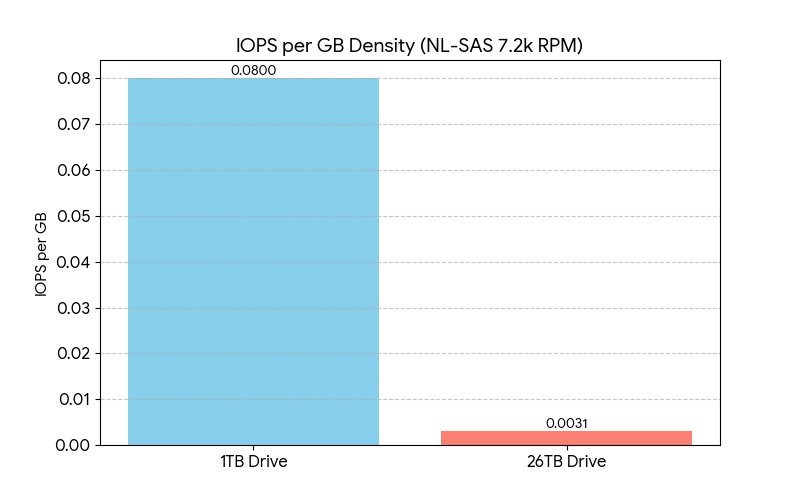

Note that 100 does’t mean sub-ms latency, it means a minimum of Queue Depth of 4-8 and Native Command Queueing re-ordering commands in the most optimal way and latency is going to be 45-80ms (Which is considered unacceptable in 2025 for transactional applications). Users are no longer willing to “Click” and wait “seconds” for responses in applications that need multiple I/O checks. It’s not uncommon to hear storage administrators refer to NL-SAS 7.2K RPM drives as “Lower latency tape.” Large NL-SAS drives (10TB+) are suitable only for archives, backups, or cold object storage where data sits idle. They are generally too slow for active workloads.
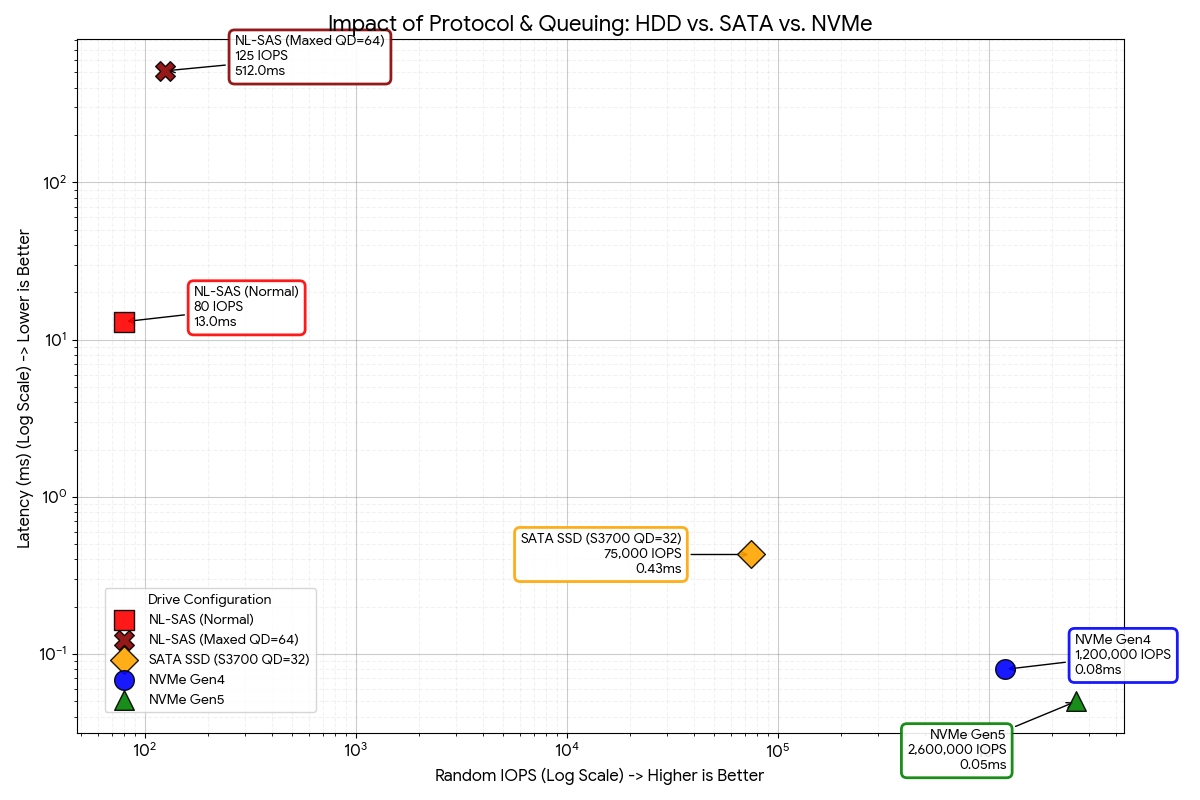
The delta in performance between between magnetic drives and the $3 per GB SATA drives when vSAN launched was large, but the jump to NVMe drives requires a logarithmic scale to measure in a meainful way that does not look ridiculous.

Single Tier ESA vs. Cache design

1. Cache Misses as capacity scaled increasingly are brutal. It’s a bit like shifting from 6th gear to 1st gear while driving 200MPH.

2. You eventually start throwing so much cache at a workload that you have to ask “Why didn’t I just tier the data there… and why don’t I just go all flash and get better capacity efficiencies”
Even the cache drives used by OSA in the early days are anemic in performance compared to modern NVMe drives Modern NVMe drives are absolute monsters, and even with data services, and distributed data protection and other overheads in the I/O path they can deliver sub ms response times and six figure IOPS per nodes.

What about low activity edge locations?

I sometimes see people ask about hybrid for small embedded edge sites, trying to chase low cost but other benefits to ESA > OSA hybrid continue.

  1. ESA supports nested RAID inside the hosts for added durability. A simple 2+1 RAID 5 can be used inside of a 2 node configuration that can survive the loss of a host, the witness, and a drive in the remaining host.
  2. The Environmental tolerance of NVMe drives (heat, vibration, lower quality air) tends to result in less operationally expensive drive replacements.
  3. The Bit error rate of NVMe flash drives are significantly superior to even Enterprise NL-SAS drives.

What about Backup targets?

This blog is not highlighting a new trend. Archive tier and “copies of copies” generally are the only place that NL-SAS drives end up deployed. Increasing the industry is seeing QLC chosen as a better target for “Primary backups.” Waiting 7 hours to recover a production environment from ransomware or accidental deletion. The NL-SAS backed storage makes more sense for “beyond 90 day” and “legally mandated multi-year retention” archives. Ideally a fully hydrated “replica” on a VLR replicated cluster is ideal for stuff that wants a “minutes” recovery time objective, rather than an hour or days recovery time that NL-SAS backed dedupe appliances often deliver on.

To be fair, NL-SAS drives (like tape!) are continuing to be sold in high volume. Their use case (like tape!) though has been pushed out of the way for newer, faster more cost effective solutions for production virtual machine and container workloads. If you have nostalgia for NL-SAS drives feel free to copy your offsite DSM backup target to a hyperscaler object storage bucket as that likely is where the bulk of NL-SAS drives are ending up these days. I will caution though that QLC and private cloud object storage repo’s are coming increasing for that use case.
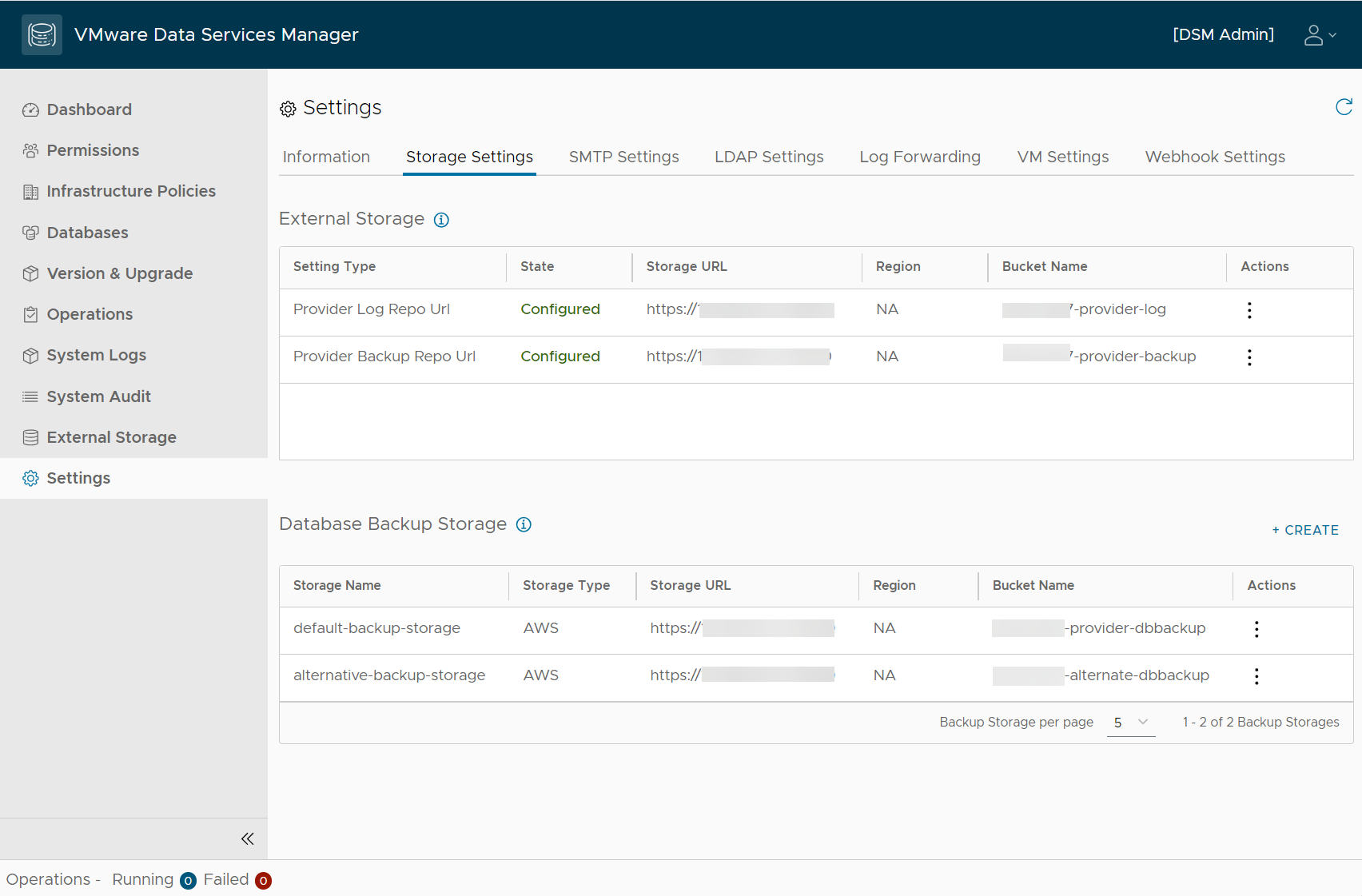

https://techdocs.broadcom.com/us/en/vmware-cis/vcf/vcf-9-0-and-later/9-0/release-notes/vmware-cloud-foundation-90-release-notes/platform-product-support-notes/product-support-notes-vsan.html

Updating ESXi using ESXCLI + Broadcom Tokens

I was going to update a lab host I have at home that is currently not managed by an external vCenter server. Historically I would do something like this to accomplish this task.

esxcli software profile update -p ESXi-8.0U2d-24585300-standard \
-d https://hostupdate.vmware.com/software/VUM/PRODUCTION/main/vmw-depot-index.xml

As has been discussed the update mirrors for vSphere now require a token to download from. In addition the paths are changing.


Current URL
Replace with
https://hostupdate.vmware.com/software/VUM/PRODUCTION/main/vmw-depot-index.xmlhttps://dl.broadcom.com/<Download Token>/PROD/COMP/ESX_HOST/main/vmw-depot-index.xml
https://hostupdate.vmware.com/software/VUM/PRODUCTION/addon-main/vmw-depot-index.xmlhttps://dl.broadcom.com/<Download Token>/PROD/COMP/ESX_HOST/addon-main/vmw-depot-index.xml
https://hostupdate.vmware.com/software/VUM/PRODUCTION/iovp-main/vmw-depot-index.xmlhttps://dl.broadcom.com/<Download Token>/PROD/COMP/ESX_HOST/iovp-main/vmw-depot-index.xml 
https://hostupdate.vmware.com/software/VUM/PRODUCTION/vmtools-main/vmw-depot-index.xmlhttps://dl.broadcom.com/<Download Token>/PROD/COMP/ESX_HOST/vmtools-main/vmw-depot-index.xml

So what does my command look like?

First go get your token.

Replacing the token into the URL path it goes something like this:

esxcli software profile update -p ESXi-8.0U3b-24280767-standard -d https://dl.broadcom.com/TOKEN_GOES_HERE/PROD/COMP/ESX_HOST/main/vmw-depot-index.xml --no-hardware-warning

What if I get a memory error?

Run the following 4 commands. William Lam has a blog on this workaround.

esxcli system settings advanced set -o /VisorFS/VisorFSPristineTardisk -i 0 
cp /usr/lib/vmware/esxcli-software /usr/lib/vmware/esxcli-software.bak sed -i 's/mem=300/mem=500/g' /usr/lib/vmware/esxcli-software.bak
mv /usr/lib/vmware/esxcli-software.bak /usr/lib/vmware/esxcli-software -f
esxcli system settings advanced set -o /VisorFS/VisorFSPristineTardisk -i 1

You’ll also need to open and close the firewall.

esxcli network firewall ruleset set -e true -r httpClient

SO let’s put all of that into a single copy paste block?

esxcli system settings advanced set -o /VisorFS/VisorFSPristineTardisk -i 0 
cp /usr/lib/vmware/esxcli-software /usr/lib/vmware/esxcli-software.bak sed -i 's/mem=300/mem=500/g' /usr/lib/vmware/esxcli-software.bak
mv /usr/lib/vmware/esxcli-software.bak /usr/lib/vmware/esxcli-software -f
esxcli system settings advanced set -o /VisorFS/VisorFSPristineTardisk -i 1
esxcli network firewall ruleset set -e true -r httpClient
esxcli software profile update -p ESXi-8.0U3b-24280767-standard -d https://dl.broadcom.com/TOKEN_GOES_HERE/PROD/COMP/ESX_HOST/main/vmw-depot-index.xml --no-hardware-warning
esxcli network firewall ruleset set -e false -r httpClient

While most people will use vCenter etc to manage hosts, for anyone with a stand alone host, or in a home lab this is a handy command to quickly patch something.

What if I get the following error?

 [MetadataDownloadError]
Could not download from depot at https://dl.broadcom.com/TOKEN_GOES_HERE/PROD/COMP/ESX_HOST/main/vmw-depot-index.xml, skipping (('https://dl.broadcom.com/TOKEN_GOES_HERE/PROD/COMP/ESX_HOST/main/vmw-depot-index.xml', '', 'HTTP Error 404: Not Found'))
url = https://dl.broadcom.com/TOKEN_GOES_HERE/PROD/COMP/ESX_HOST/main/vmw-depot-index.xml
Please refer to the log file for more details.

You forgot to replace the placeholder for the token code I put in the syntax. 🙂

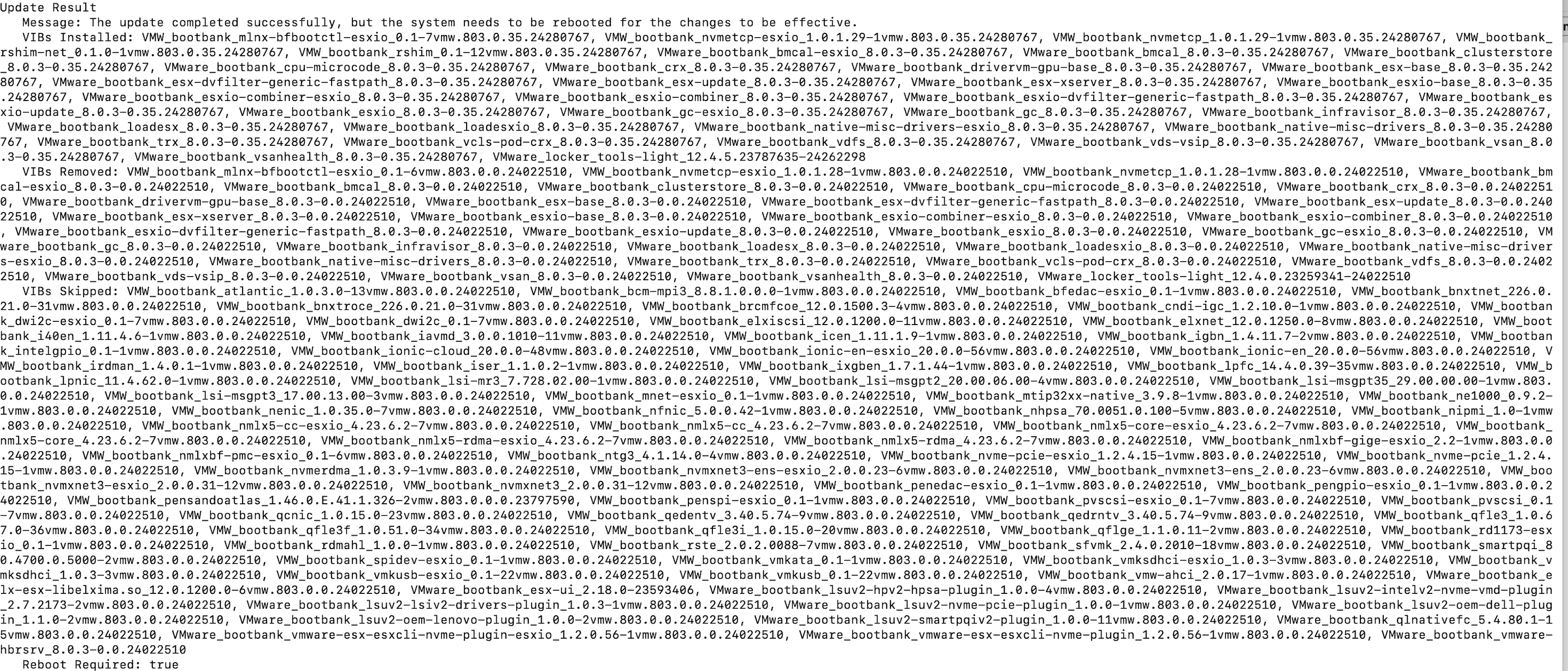
If it runs successfully you should be greeted with a big wall of text.

Picking out drive cages for a HPE vSAN ESA ReadyNode (DL360 Gen Edition!)

This comes from a twitter thread here, and ThreadReader roll up (For people not signed into twitter)

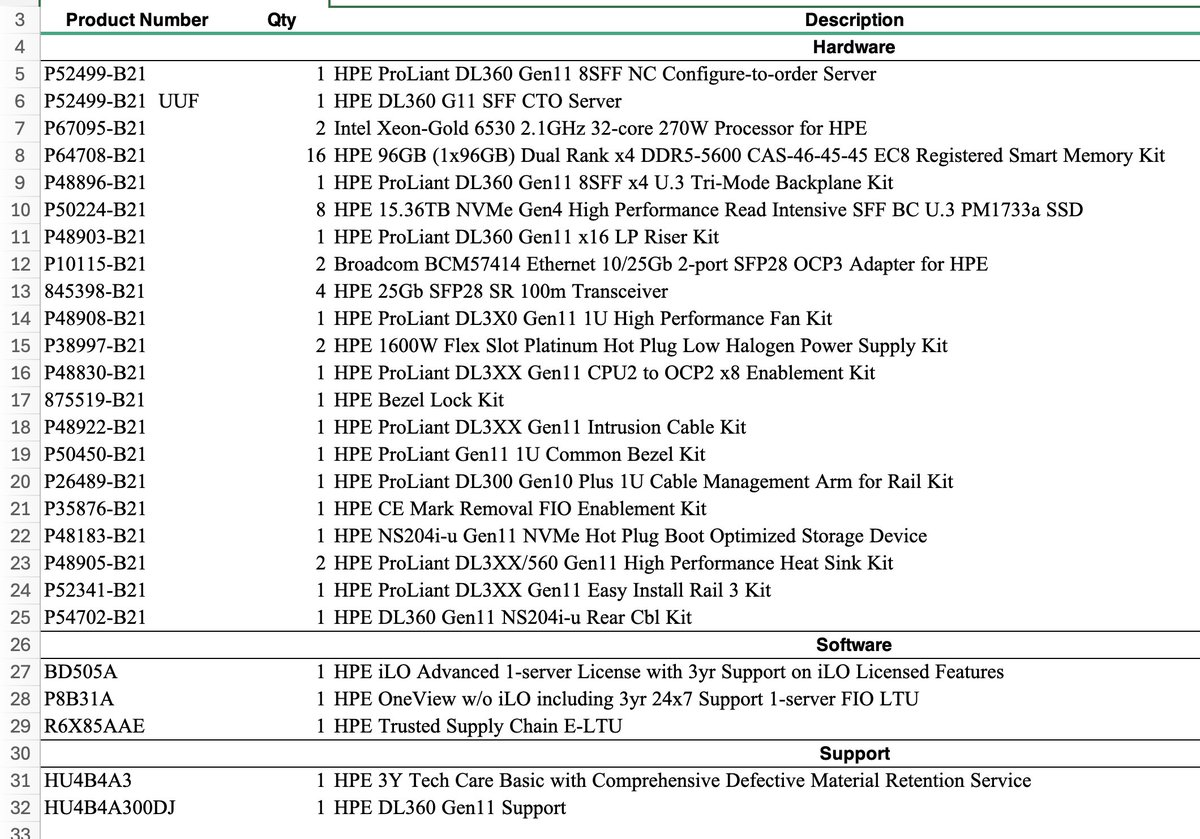
Is this Server vSAN ESA Compatible @HPE DL360 Gen Edition! A BOM Review 🧵

First off the key things we want to focus on are:

What’s on the BOM:

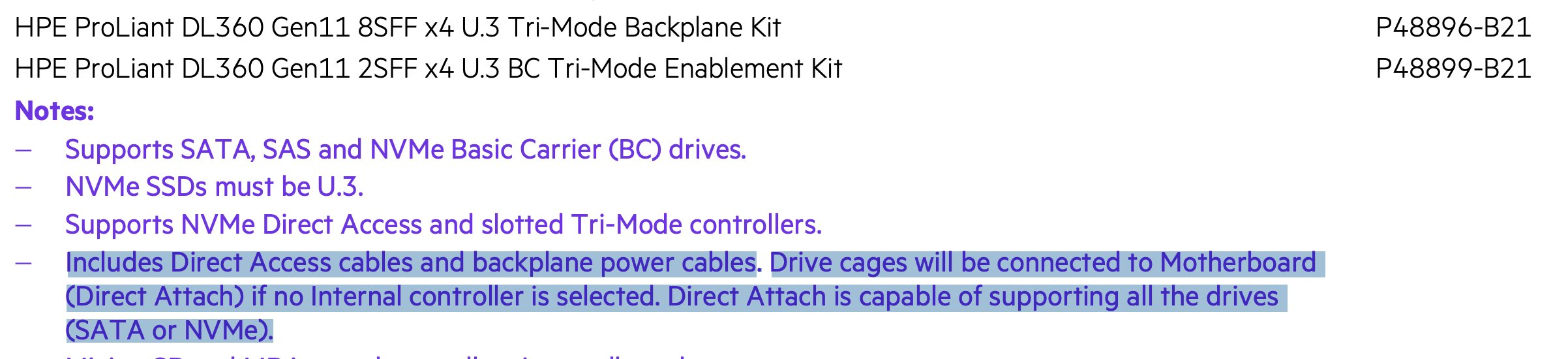
“HPE ProLiant DL360 Gen11 8SFF x4 U.3 Tri-Mode Backplane Kit”

“HPE 15.36TB NVMe Gen4 High Performance Read Intensive SFF BC U.3 PM1733a SSD”

What’s not on the BOM:

SmartArray/RAID controller 

First off: HPE 15.36TB NVMe Gen4 High Performance Read Intensive SFF BC U.3 PM1733a SSD

Here is a search for all HPE drives on the vSAN VCG:

https://www.vmware.com/resources/compatibility/search.php?deviceCategory=ssd&details=1&vsan_type=vsanssd&ssd_partner=515&ssd_tier=4&keyword=PM1733a&vsanrncomp=true&page=1&display_interval=10&sortColumn=Partner&sortOrder=Asc

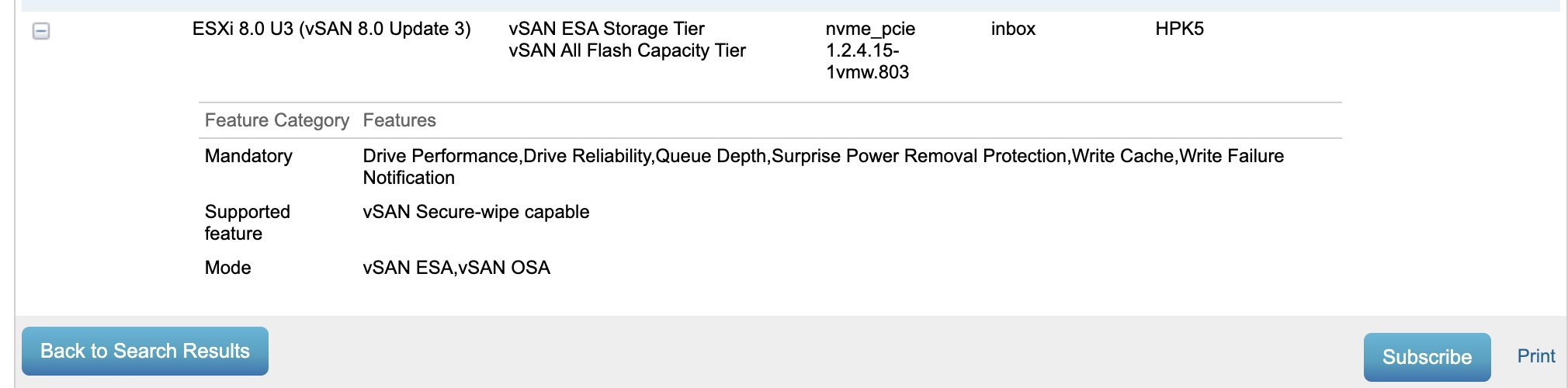
Here is the drive in question:

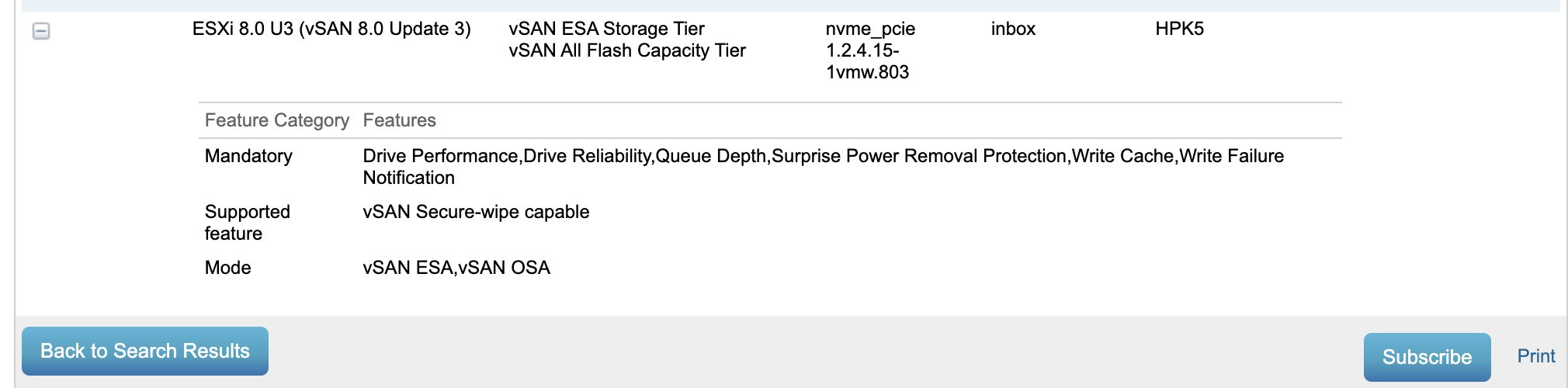
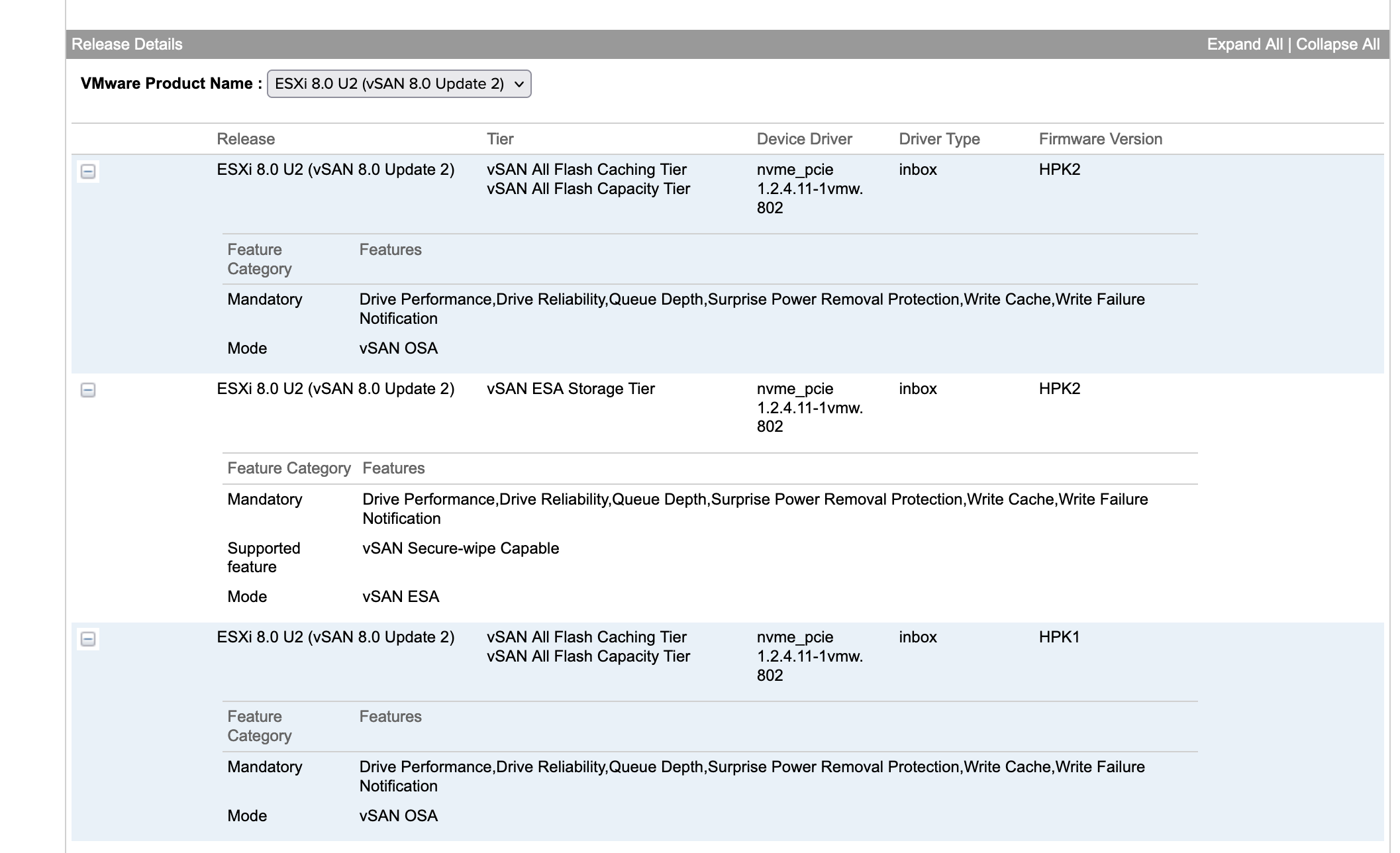
Note while you are here click the “Subscribe” button in the bottom corner for updates to changes on the VCG and note this uses the inbox driver, with the newest supported firmware being HPK5. Also certified for ESA.

vmware.com/resources/comp…


https://www.vmware.com/resources/compatibility/detail.php?deviceCategory=ssd&productid=51437&deviceCategory=ssd&details=1&vsan_type=vsanssd&ssd_partner=515&ssd_tier=4&keyword=PM1733a&vsanrncomp=true&page=1&display_interval=10&sortColumn=Partner&sortOrder=Asc

While I”m here I’ll check what that firmware version fixed. Looks fairly serious from a stability basis so I’ll make sure to use HPE’s HSM + vLCM to patc this drive to the current firmware.

https://support.hpe.com/hpesc/public/docDisplay?docId=a00112800en_us&docLocale=en_US

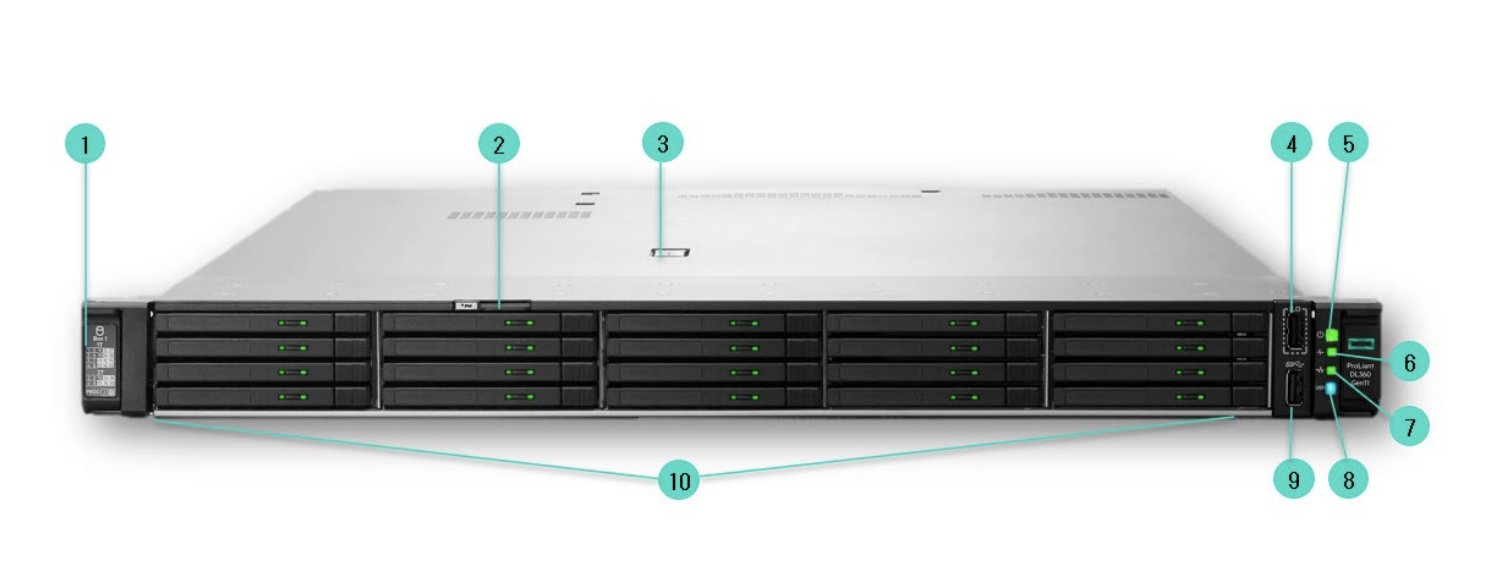
Next up let’s look at P48896-B21: 1 HPE ProLiant DL360 Gen11 8SFF x4 U.3 Tri-Mode Backplane Kit

So this is the drive cage you NEED to use NVMe in a DL360 as it gives 4 PCI-E lanes to each drive (vs the cheaper basic one that only is 1x and only supports SATA in pass through. 

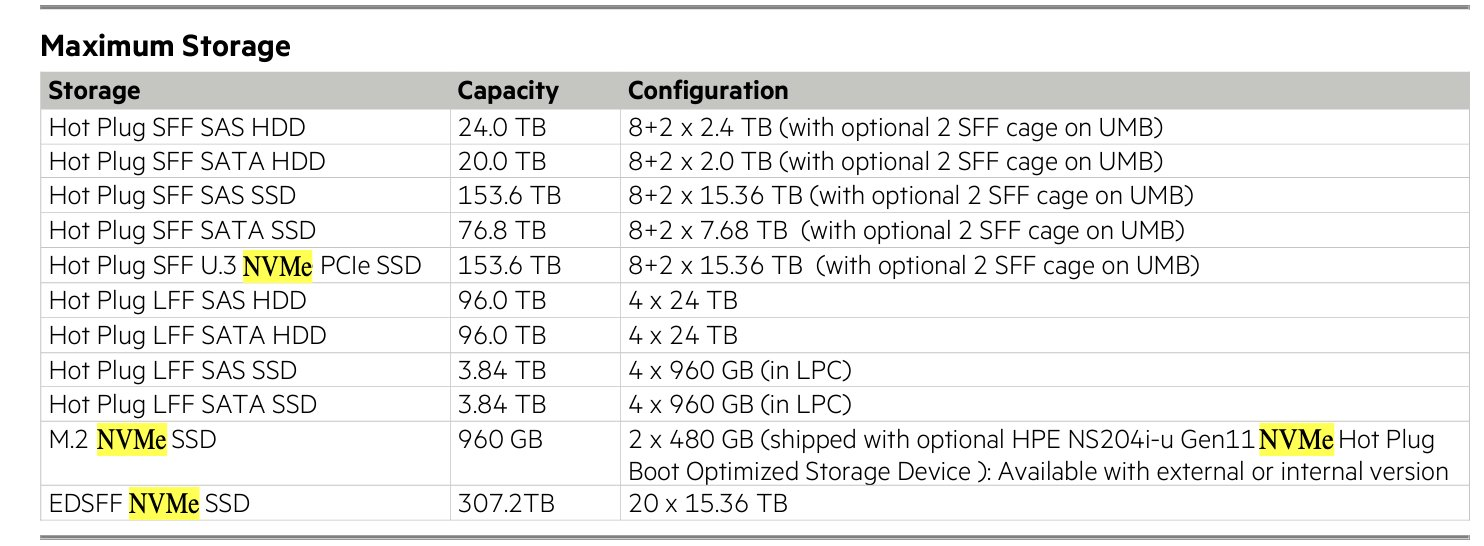
Looking at the QuickSpecs There are a 3 other options for ESA vSAN.

LFF 3.5”: Can’t do NVMe pass through.

24G x 1 NVMe/SAS U3. Can’t do NVMe pass through, and frankly will underperform with NVMe drives even if used for RAID.

20EDSFF – Supported for ESA.

LFF Server (not supported for VSAN ESA)

Rambling out loud, I think E3 form factor stuff is a better play in the long term as it allows more density. 2.5” SFF really is going to end up legacy for greenfield that shouldn’t be needed.

Note the E3 config will support 300TB, 2x the SFF ones.
(Please go 100Gbps networking if your doing something that dense!)

We do have a NS204i-u, but that is only for a pair of M.2 boot devices (and a GREAT idea for boot, stop doing SD card, boot from SAN weird stuff!). This WILL NOT and cannot be used with the larger SFF or E3 format drives (and that’s a good thing!). 

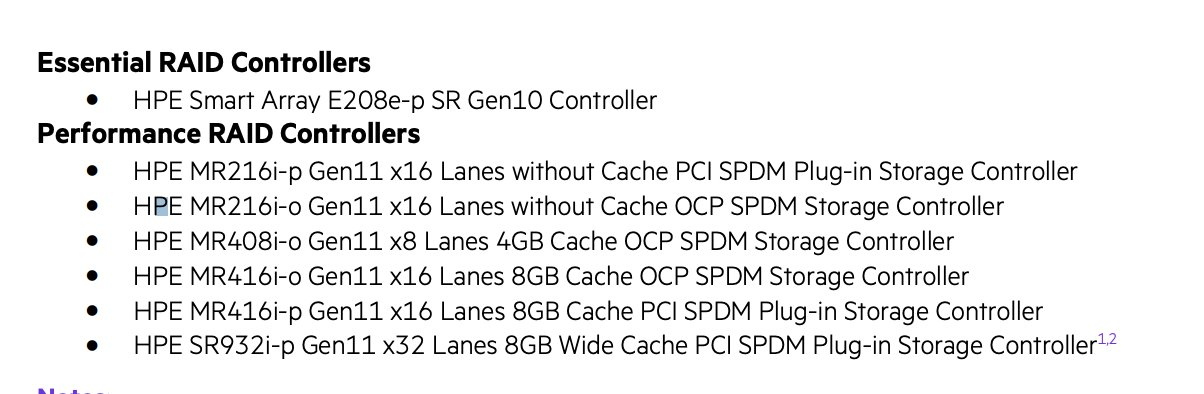
Next up what’s missing. There is NOT a RAID controller (Generally starts with MR or SR). If there’s one of these the NVMe drives will potentially be cabled to it (and that’s bad, and not supported by vSAN ESA).

Per the quickspecs:

“Includes Direct Access cables and backplane power cables. Drive cages will be connected to Motherboard (Direct Attach) if no Internal controller is selected. Direct Attach is capable of supporting all the drives (SATA or NVMe).”

Now I’ll note this BOM only supports 8 drives, but if your willing to not have an optical drives, or a front USB/Display port There is a way to get 2 more cabled in:

HPE ProLiant DL360 Gen11 2SFF x4 U.3 BC Tri-Mode Enablement Kit P48899-B21 

One other BOM review item. They went 4 x 25Gbps. If you don’t already have 25Gbps TOR switches I would honestly go 2 x 100Gbps. It’s about 20% more cost all in with cables and optics, but it’s 2x the bandwidth and the rack will look prettier. 

There’s also not an Intel VROC license/config item on here. This is a “software(ish) RAID option for NVMe. We don’t need/want this for vSAN ESA. In theory there might be a way to use this for a boot device but use the NS controller instead for now.

In general talk to your HPE Solution architects, their quoting tools should be able to help (HPE always had really good channel tools), if possible start with a ReadyNode/vSAN ESA option to lock out bad choices.

Thanks to Dan R for providing me some insight into this. 

I’m sure @plankers already noticed the lack of a TPM.

It’s now embedded, and disabled if your servers is going to China.

I’m glad HPE stoped making this an removable option.

nother point, for anyone playing with the new memory Tiering, you also are going to want that cabled this way, as that feature is not supported through a RAID controller either. 

What Happens When I Change the Key Provider, KMIP, Native Key Provider, NKP, for vSAN Encryption?

What Happens When I Change the Key Provider, KMIP, Native Key Provider, NKP, for vSAN Encryption? vSAN encryption provides easy, fast data at rest encryption, as well as a unique data in transit encryption option. Data at rest encryption specifically requires a key provider to be used. This can either be an external KIMP provider (Certification list found here), as well as a native key provider option that is bundled with the vCenter Server. For various reasons a customer may wish to switch keys, or even switch to keys provided by a different key provider.

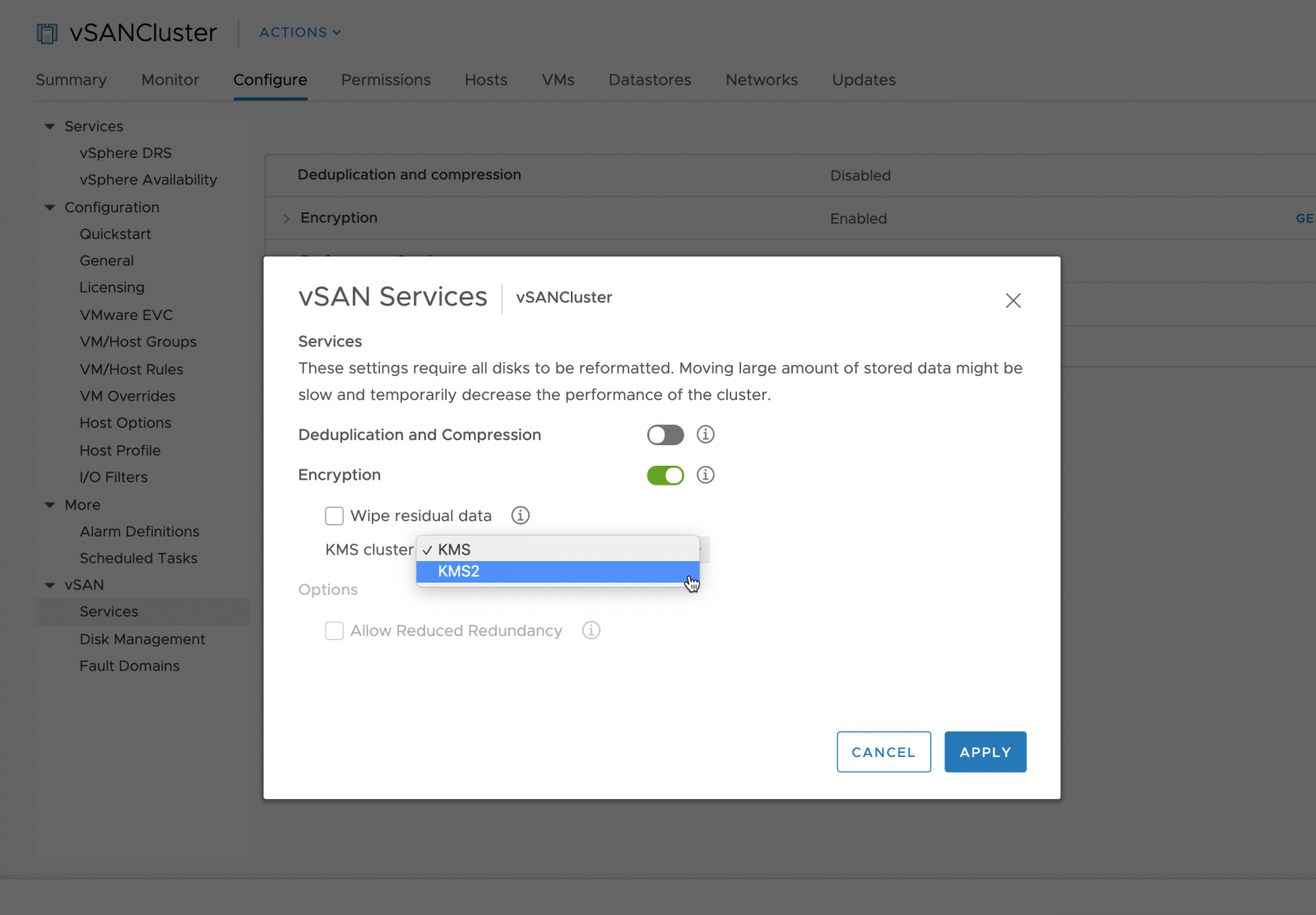
“Can I change the Key provider, KMIP, Native Key Provider, NKP, for vSAN/vSphere Encryption?” The short response is “yes” this is quick/easy and supported. Within the UI you will change to the new keys used, anda shallow rekey operation will kick-off.

What happens when I change the keys? Changing the keys is a shallow rekey operation, NOT a deep rekey operation. What does that mean? A deep key swaps the KEK and DEK and forces a re-write of all of the data to the disk groups one at a time,this kind of operation can take a rather long time. A shallow re-key is rather quick as it will create new anew KEK for the cluster and push it to the hosts. Each device’s DEK will then be re-wrapped with the new KEK+DEK combination.

  • The full process to change the keys from within the UI is as follows:
  • The initial KMS configuration is in place
  • The administrator selects an alternate KMS Cluster
  • The new KMS configuration is pushed to the vSAN hosts
  • A new host key is generated
  • vSAN performs a Shallow Rekey

More information on vSAN Encryption operations can be found in the VSAN Encryption Services Tech note.

My Dog

Meet Otto. He’s a rescue who’s I guess around 10 years old, weighs 11-12 pounds and likes children and all people.

His likes are naps, sunning himself in the yard, and making me take him on 2-3 walks a day to keep me in shape.

He is weirdly quiet (Doesn’t bark), and doesn’t really make a mess or scratch at things.

I was told by my agent to attach a photo for landlords to see to applications, and finding some of their platforms don’t make this an option, will just embed a link to this blog post. If you see him on a greenbelt trail you or your children are welcome to pet him, he’s extremely harmless.

is HPE Tri-Mode Supported for ESA?

No.

Now, the real details are a bit more complicated than that. It’s possible to use the 8SFF 4x U.3 TriMode (not x1) backplane kit, but only if the server was built out with only NVMe drives, and no RAID controller/Smart Array. Personally I’d build of of E.3 drives. For a full BOM review and a bit more detail check out this twitter thread on the topic where I go step by step through the BOM outlining what’s on it, why and what’s missing.

How to configure a fast end to end NVMe I/O path for vSAN

A quick blog post as this came up recently. Someone who was looking t NVMoF with their storage was asking how do they configure a similar end to end vSAN NVMe I/O path that avoids SCSI or serial I/O queues.

Why would you want this? NVMe in general uses significantly less CPU per IOP compared to SCSI, has simpler hardware requirements commonly (no HBA needed), and can deliver higher throughput and IOPS at lower latency using parallel queuing.

This is simple:

  1. Start with vSAN certified NVMe drives.
  2. Use vSAN ESA instead of OSA (It was designed for NVMe and parralel queues in mind, with additional threading at the DOM layer etc).
  3. Start with 25Gbps ethernet, but consider 50 or 100Gbps if performance is your top concern.
  4. Configure the vNVMe adapter instead of the vSCSI or LSI Buslogic etc. controllers.
  5. (Optional) – Want to shed the bonds of TCP and lower networking overhead? Consider configuring vSAN RDMA (RCoE). This does require some specific configuration to implement, and is not required but for customers pushing the limits of 100Gbps in throughput this is something to consider.
  6. Deploy the newest vSAN version. The vSAN I/O path has seen a number of improvements even since 8.0GA that make it important to upgrade to maximize performance.

To get started adda. NVMe Controller to your virtual machines, and make sure VMtools is installed in the guest OS of your templates.

Note you can Migrate existing VMDKs to vNVMe (I recommend doing this with the VM powered off). Also before you do this you will want to install VMtools (So you have the VMware paravirtual NVMe controller driver installed).

RDTBench – Testing vSAN, RDMA and TCP between hosts

A while back I was asking engineering how they tested RDMA between hosts and stumbled upon RDTBench. This is a traffic generator, where you configure one host to act as a “server” and 1 to several hosts to act as clients communicating with it. This is a great tool for testing networking throughput before production use of a host, as well as validating RDMA configurations as it can be configured to generate vSAN RDMA traffic. Pings and IPERF are great, but being able to simulate RDT (vSAN protocol) traffic has it’s advantages.

RDT Bench does manifest itself as traffic on the vSAN Performance service host networking graphs
A few quick questions about it:

Where is it?

/usr/lib/vmware/vsan/bin

How do I run it?
You need to run it on two different hosts. One host will need to be configured to act as a client (by default it runs as a server). For the server I commonly use the -b flag to make it run bi-bidirectionally on the transport. -p rdma will run it in RDMA mode to test RDMA.

If RDMA is not working, go ahead and turn vSAN RDMA on (cluster, config, networking).

vSAN will “fail safe” back to TCP, but tell you what is missing from your configuration.

./rdtbench -h will provide the full list of command help.

For now this tool primarily exists for engineering (used for RDMA NIC validation) as well as support (as a more realistic alternative to IPERF), but I’m curious how we can incorporate it into other workflows for testing the health of a cluster.

Where to run your vCenter Server? (On a vSAN Stretched Cluster)

In a perfect world, you have a management cluster, that hosts your vCenter server and you the management of every cluster lives somewhere else. Unfortunately the real world happens and:

  • Something has to manage the management cluster.
  • Sometimes you need a cluster to be completely stand alone. 

Can I run the vCenter server on the cluster it manages?

It is FULLY supported to run the vCenter Server on the cluster that it is managing. HA will still work. If you want a deeper dive on this issue this short video covers this question. 

So what is the best advise when doing this?

  1. Use ephemeral port groups for all management networks. This prevents vDS chicken egg issues that are annoying but not impossible to work around. 
  2. I prefer to use DRS SHOULD rules so the center will “normally” live on the lowest host number/IP address in the cluster. This is useful for a situation where vCenter is unhealthy and the management services are failing to start, it makes it easy to find which host is running it. Make sure to avoid using “MUST” rules for this as it would prevent vCenter from running anywhere else in the event that host fails. 
You can attach VMK ports to a ephemeral port group even if the VCSA is offline

But what about a stretched Cluster? I have a stand alone host to run the witness server should I put it there? 

No, I would not recommend this design. It is always preferable to run the vCenter server somewhere that it will enjoy HA protection, and not need to be powered off to patch a host. vSAN stretched clusters always support active/active operations, many customers often configure them with most workloads running in the preferred datacenter location. If you use this configuration I recommend you run the vCenter server in the secondary location for a few reasons:

  1. In the event the primary datacenter fails, you will not be “Operationally blind” as HA is firing off, and recovering workloads. This lowers any operational blindspots that would happen for a few minutes while vCenter server fails over. 
  2. It will act as a weathervane to the health of the secondary datacenter. It is generally good to have SOME sort of workload running at the secondary site to provide some understanding of how those hosts will perform, even if it is a relatively light load.

Disable Intel VMD for drives being used for VMware vSAN

My recommendation is to please disable Intel VMD (Volume Manage Devices) and use the native NVMe inbox drive to mount devices for VMware vSAN going forward. To be clear Intel VMD is NOT a bad technology, but we do not need/want it in the I/O path for VMware vSAN going forward. It can be useful to do RAID on Chip for NVMe boot devices. In addition it was the only method to reliably get hotplug and serviceability (blink lights) prior the NVMe spec being “finished”, hence why it was sometimes used for some older early NVMe vSAN configurations.

Looking at the VCG a number of drive are only being certified using the Inbox driver and not the Intel driver.

To disable this you need to configure the Bios/UEFI. Here’s an example for Lenovo (who I think defaults to it enabled).

Jason Massae has a great blog that covers hoe to use Intel VMD in more details and Intel has their own documentation for non-vSAN use cases.