How to handle isolation with scale out storage

I would like to say that this post was inspired by Chad’s guide to storage architectures. When talking to customers over the years a recurring problem surfaced.  Storage historically in the smaller enterprises tended towards people going “all in” on one big array. The idea was that by consolidating the purchasing of all of the different application groups, and teams they could get the most “bang for buck”.  The upsides are obvious (Fewer silo’s and consolidation of resources and platforms means lower capex/opex costs). The performance downsides were annoying but could be mitigated. (normally noisy neighbor performance issues). That said the real downside to having one (or a few) big arrays are often found hidden on the operational side.

  1. Many customers trying to stretch their budget often ended up putting Test/Dev/QA and production on the same array (I’ve seen Fortune 100 companies do this with business critical workloads). This leads to one team demanding 2 year old firmware for stability, and the teams needing agility trying to get upgrades. The battle between stability and agility gets fought regularly in the change control committee meetings further wasting more people’s time.
  2. Audit/regime change/regulatory/customer demands require an air gap be established for a new or existing workload. Array partitioning features are nice, but the demands often extend beyond this.
  3. In some cases, organizations that had previously shared resources would part ways. (divestment, operational restructuring, budgetary firewalls).

Feed me RAM!
“Not so stealthy database”

Some storage workloads just need more performance than everyone else, and often the cost of the upgrade is increased by the other workloads on the array that will gain no material benefit. Database Administrators often point to a lack of dedicated resources when performance problems arise.  Providing isolation for these workloads historically involved buying an exotic non-x86 processor, and a “black box” appliance that required expensive specialty skills on top of significant Capex cost. I like to call these boxes “cloaking devices” as they often are often completely hidden from the normal infrastructure monitoring teams.

A benefit to using a Scale out (Type III)  approach is that the storage can be scaled down (or even divided).  VMware VSAN can evacuate data from a host, and allow you to shift its resources to another cluster. As Hybrid nodes can push up to 40K IOPS (and all flash over 100K) allowing even smaller clusters to hold their own on disk performance. It is worth noting that the reverse action is also possible. When a legacy application is retired, the cluster that served it can be upgraded and merged into other clusters. In this way the isolation is really just a resource silo (the least threatening of all IT silos).  You can still use the same software stack, and leverage the same skill set while keeping change control, auditors and developers happy. Even the Database administrators will be happy to learn that they can push millions of orders per minute with a simple 4 node cluster.

In principal I still like to avoid silos. If they must exist, I would suggest trying to find a way that the hardware that makes them up is highly portable and re-usable and VSAN and vSphere can help with that quite a bit.

 

Upcoming Live/Web events…

Spiceworks  Dec 1st @ 1PM Central- “Is blade architecture dead” a panel discussion on why HCI is replacing legacy blade designs, and talk about use cases for VMware VSAN.

Micron Dec 3rd @ 2PM Central – “Go All Flash or go home”   We will discuss what is new with all flash VSAN, what fast new things Micron’s performance lab is up to, and an amazing discussion/QA with Micron’s team. Specifically this should be a great discussion about why 10K and 15K RPM drives are no longer going to make sense going forward.

Intel Dec 16th @ 12PM Central – This is looking to be a great discussion around why Intel architecture (Network, Storage, Compute) is powerful for getting the most out of VMware Virtual SAN.

Is VDI really not “serious” production?

This post is in response to a tweet by Chris Evans (Who I have MUCH respect for and is one of the people that I follow on a daily basis on all forms of internet media). The discussion on twitter was unrelated (Discussing the failings of XtremeIO) and the point that triggered this post was when he stated VDI is “Not serious production”.

While I might have agreed 2-3 years ago when VDI was often in POC, or a plaything of remote road warriors or a CEO, VDI has come a long way in adoption. I’m working at a company this week with 500 users and ALL users outside of a handful of IT staff work in VDI at all times. I”m helping them update their service desk operations and a minor issue with VDI (profile server problems) is a critical full stoppage of the business. Even if all of their 3 critical LOB apps going down would be less of an impact. At least people could still access email, jabber and some local files.

There are two perspectives I have from this.

1. Some people are actually dependent on VDI to access all those 99.99999% uptime SLA apps so its part of the dependency tree.

2. We need to quit using 99.9% SLA up-time systems and process’s to keep VDI up. It needs real systems, change control, monitoring and budget. 2 years ago I viewed vCOPS for View as an expensive necessity, now I view it as a must have solution. I’m deploying tools like LogInsight to get better information and telemetry of whats going on, and training service desks on the fundamentals of VDI management (that used to be the task of a handful of sysadmins). While it may not replace the traditional PC and in many ways is a middle ground towards some SaaS web/mobile app future, its a lot more serious today than a lot of people realize.

I’ve often joked that VDI is the technology of last resort when no other reasonable offering made sense (Keep data in datacenter, solve apps that don’t work under RDS, organizations who can’t figure out patch/app distribution, highly mobile but poorly secured workforce). For better or for worse its become the best tool for a lot of shops, and its time to give it the respect it deserves.

At least the tools we use to make VDI serious today (VSAN/VCOPS/LogInsight/HorzionView6) are a lot more serious than the stuff I was using 4 years ago.

My apologies, for calling our Chris (which wasn’t really the point of this article) but I will thank him for giving me cause to reflect on the state of VDI “seriousness” today.

How does your organization view and depend on VDI today, and is there a gap in perception?

VMworld Day 1

I’m looking forward to this week and here are a few highlights of what I’ll be looking into.

On the tactical

1. Settling on a primary load balancing partner for VMware View. (Eying Kemp, anyone have any thoughts?). I’ve got a number of smaller deployments (few hundred users) that need non-disruptive maintenance operations, and patching on the infrastructure and are looking to take their smaller pilots or deployments forward.

2. Learn more about VDP-A designs, and best practices. I’ve seen some issues in the lab with snapshots not getting removed from the appliance and need to understand the scaling and design considerations better.

3. Check out some of the HOL updates. Find out if a VVOL lab in the office is worth the investment.

On the more general strategic goals.

Check out cutting edge vendors, and technologies from VMware.

CloudVolumes – More than just application layering. Server application delivery, Profile abstraction thats fast and portable, and a serious uplift to persona and ThinApp. Really interested in use cases having it used as a delivery method for Thinapp.

DataGravity – In the era of software defined storage this is a company making a case that an array can provide a lot of value still. Very interesting technology but the questions remain. Does it work? Does it Scale? Will they add more file systems, and how soon will EMC/HP buy them to bolt this logic into their Tier 1 arrays. Martin Glassborow has made a lot of statements that new vendors don’t do enough to differentiate, or that we’ve reached peak features (Snaps, replication, cache/tier flash, data reduction etc) but its interesting to see someone potentially breaking outside of this mold of just doing the same thing a little better or cheaper.

VSAN – Who is Marvin? What happened to Virsto? I’ve got questions and I hope someone has answers!

VSAN build #2 Part 1 JBOD Setup and Blinkin Lights

(Update, the SM2208 controller in this system is being removed from the HCL for pass through.  Use RAID 0)

Its time to discuss the second VSAN build. This time we’ve got something more production ready, properly redundant on switching and ready to deliver better performance. The platform used is the SuperServer F627R2-F72PT+

The Spec’s for the 4 node’s

2 x 1TB Seagate Constellation SAS drives.
1 x 400GB Intel SSD S3700.
12 x 16GB DDR3 RAM (192GB).
2 x Intel Xeon E5-2660 v2 Processor Ten-Core 2.2GHz
The Back end Switches have been upgraded to the more respectable M7100 NetGear switches.

Now the LSI 2208 Controller for this is not a pass through SAS controller but an actual RAID controller. This does add some setup, but it does have a significant queue depth advantage over the 2008 in my current lab (25 vs 600). Queues are particularly important when dropping out of cache bursts of writes to my SAS drives. (Say from a VDI recompose). Also Deep queues help SSD’s internally optimize commands for write coalescence internally.

If you go into the GUI at first you’ll be greeted with only RAID 0 as an option for setting up the drives. After a quick email to Reza at SuperMicro he directed me to how to use the CLI to get this done.

CNTRL + Y will get you into the Megaraid CLI which is required to set JBOD mode so SMART info will be passed through to ESXi.

$ AdpGetProp enablejbod -aALL // This will tell you the current JBOD setting
$ AdpSetProp EnableJBOD 1 -aALL //This will set JBOD for the Array
$ PDList -aALL -page24 // This will list all your devices
$ PDMakeGood -PhysDrv[252:0,252:1,252:2] -Force -a0 //This would force drives 0-2 as good
$ PDMakeJBOD -PhysDrv[252:0,252:1,252:2] -a0 //This sets drives 0-2 into JBOD mode

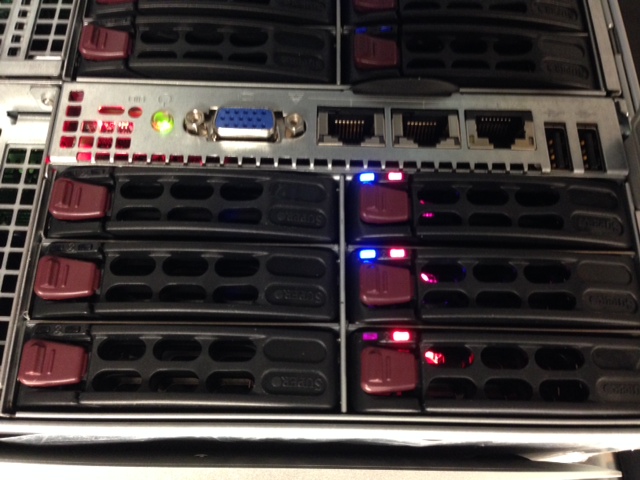
They look angry don't they?
They look angry don’t they?

Now if you havn’t upgraded the firware to at least MR5.5 (23.10.0.-0021) you’ll discover that you have red drive lights on your drives. You’ll want to grab your handy dos boot disk and get the firmware from SuperMicro’s FTP.

I’d like to thank Lucid Solution’s guide for ZFS as a great reference.

I’d like to give a shout out to the people who made this build possible.

Phil Lessley @AKSeqSolTech for introducing me to the joys of SuperMicro FatTwin’s some time ago.
Synchronet, for continuing to fund great lab hardware and finding customers wanting to deploy revolutionary storage products.