The VSAN build 2 (Watch out for partitions!)

A quick post. So my disks had been burn in tested by AcmeMicro so they had partitions on them. VSAN will to protect you from yourself refuse to install on disks with existing partitions.

A quick check for the disk ID’s (naa.##############). needs to be run.

~ # esxcli storage core device list
naa.5000c500583aeb07
Display Name: Local SEAGATE Disk (naa.5000c500583aeb05)

Once you have the ID’s check for partition tables (Note the second line first number is the partition number so in this case I have a partition 1 and 2).

~ # partedUtil getptbl /dev/disks/naa.5000c500583aeb05
msdos
121601 255 63 1953525168
1 2048 718847 7 128
2 718848 1951168511 7 0

Last we have to delete the partition info.

~ # partedUtil delete /vmfs/devices/disks/naa.5000c500583aeb05 1
~ # partedUtil delete /vmfs/devices/disks/naa.5000c500583aeb05 2

At this point we can now install VSAN and eat cake 🙂

VSAN build #2 Part 1 JBOD Setup and Blinkin Lights

(Update, the SM2208 controller in this system is being removed from the HCL for pass through.  Use RAID 0)

Its time to discuss the second VSAN build. This time we’ve got something more production ready, properly redundant on switching and ready to deliver better performance. The platform used is the SuperServer F627R2-F72PT+

The Spec’s for the 4 node’s

2 x 1TB Seagate Constellation SAS drives.
1 x 400GB Intel SSD S3700.
12 x 16GB DDR3 RAM (192GB).
2 x Intel Xeon E5-2660 v2 Processor Ten-Core 2.2GHz
The Back end Switches have been upgraded to the more respectable M7100 NetGear switches.

Now the LSI 2208 Controller for this is not a pass through SAS controller but an actual RAID controller. This does add some setup, but it does have a significant queue depth advantage over the 2008 in my current lab (25 vs 600). Queues are particularly important when dropping out of cache bursts of writes to my SAS drives. (Say from a VDI recompose). Also Deep queues help SSD’s internally optimize commands for write coalescence internally.

If you go into the GUI at first you’ll be greeted with only RAID 0 as an option for setting up the drives. After a quick email to Reza at SuperMicro he directed me to how to use the CLI to get this done.

CNTRL + Y will get you into the Megaraid CLI which is required to set JBOD mode so SMART info will be passed through to ESXi.

$ AdpGetProp enablejbod -aALL // This will tell you the current JBOD setting
$ AdpSetProp EnableJBOD 1 -aALL //This will set JBOD for the Array
$ PDList -aALL -page24 // This will list all your devices
$ PDMakeGood -PhysDrv[252:0,252:1,252:2] -Force -a0 //This would force drives 0-2 as good
$ PDMakeJBOD -PhysDrv[252:0,252:1,252:2] -a0 //This sets drives 0-2 into JBOD mode

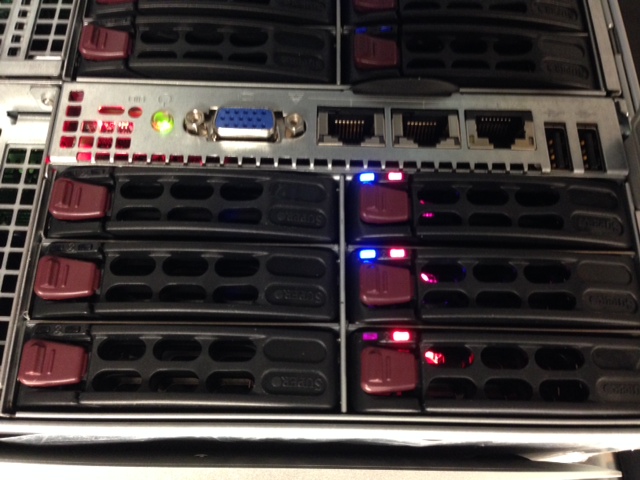
They look angry don't they?
They look angry don’t they?

Now if you havn’t upgraded the firware to at least MR5.5 (23.10.0.-0021) you’ll discover that you have red drive lights on your drives. You’ll want to grab your handy dos boot disk and get the firmware from SuperMicro’s FTP.

I’d like to thank Lucid Solution’s guide for ZFS as a great reference.

I’d like to give a shout out to the people who made this build possible.

Phil Lessley @AKSeqSolTech for introducing me to the joys of SuperMicro FatTwin’s some time ago.
Synchronet, for continuing to fund great lab hardware and finding customers wanting to deploy revolutionary storage products.

Migrate from Windows to Linux Appliance vCenter Server

A quick post here for people migrating to the VCSA. I just wanted to point out that the Inventory Snapshot tool at VMware Flings is a great way to ease the migration from a Windows to a Linux vCenter Server or help “backup” the configuration of a vCenter Server. It doesn’t get everything You’ll still want to backup and restore distributing switching especially, as well as be aware you’ll loose historical performance information but this does simplify a lot of other re-work that would normally need to be done for the migration. The following does need to be redone or migrated separately but at least this can help quite a bit.

– Cluster rules
– Cluster DRS groups
– Cluster EVC mode setting
– Customization Specifications
– Scheduled tasks
– vDS

https://labs.vmware.com/flings/inventorysnapshot

What you mean to say about VSAN

Having spent some time with VSAN, and talking to customers there is a lot of excitement. It goes without fail that some people who are selling other scale out storage, and traditional solutions might be a little less excited. I have a few quick thoughts on Henderson.

He points out that VSAN is not concerned with data location. He goes on to say that this will limit performance as data will have to be read over the network and this will prevent scalability as VM’s sprawl across hosts, that the increased east west traffic back to the storage will cause bottlenecks. In reality a 16 node VSAN cluster will likely be served by a single stack of 10Gbps Core or TOR switches and this will potentially have fewer hops than a large centralized Netapp or Pure or other traditional big iron array that is trying to serve multiple clusters and having to contend with switch uplinks. Limiting this traffic to the cluster actually makes it easier to handle, as there is less contention and stress points. All traditional vendors require random reads reach out over a storage network (and In Netapp Cluster Mode or Isilon deployments may be any number of different nodes). Given that VSAN does not use NFS or iSCSI, but a simpler more lightweight protocol would actually imply that this might even put a simpler, lower load on the network. IBM’s XIV system (Their Tier 1.5 solution for anyone who does not need a DS 8000) even uses a similar design internally. This is not a “fragile” or 1.0 design. It is one used extensively in the storage world today.

Next he goes on to dwell on recommendations of 10Gbps for the storage network. This is no different than what a typical architect would design for a high throughput Netapp or Pure deployment. If you need lots of storage IO, you deploy lots of network. This is nothing particularly novel. While he cites Duncan saying 10Gbps is recommended he ignores Duncan’s great article on how VSAN can be deployed on a 2 x 10Gbps connected host using vSphere Network IO Control to maintain performance and control port costs.

He points out that a VSAN with 16 core host could use up 2 cores (in reality I’m not seeing this in my lab). I would question, what his thoughts on Nutanix (I’ve heard as many as 8 vCPU’s for the CVM?). There is always a tradeoff when offloading storage (or adding fancy features like inline dedupe). I will agree When you are paying for expensive Oracle, SQL and Datacenter licenses by the socket, anything that robs CPU can get expensive. That is why VSAN was designed to be lightweight on CPU, was placed in the kernel, and does not include other vCPU sucking features like Compression and Dedupe. Considering CPU power seems to be the new benchmark of licensing, keeping this under control is key if VSAN is going to be used for business critical applications.

I think he missed the point of Application centric virtual machine storage. It is not about having a single container to put all the virtual machines in. Its about being able to dynamically assign policies to virtual machines. Its about being able to have applications reach into VMware, and using VASA and the native API’s to define their own striping and mirroring, and caching policies on the fly. An early example of this is VMware View automatically defining and assigning unique policies for linked clones and replica’s that are optimized based on their IO and protection needs. Honestly it wouldn’t take much to layer on a future storage DRS, that added striping or caching based on SLA enforcement (And realistically its something you could hack together with with power-shell if you think about it).

His final sendoff seems an attempt at putting VSAN in a SMB discount box.

“The product itself is less mature, unproven in a wide cross-section of production data centers, and lacking core capabilities needed to deliver the reliability, scalability, and performance that customers require.”

I feel that this is a bit harsh for a product that can define quadruple mirroring of a VM or VMDK, can strike close to a million read IOPS on a cluster (and a few hundred thousand write), can handle 16 node clusters, can scale almost as well as a flash array at VDI.

Set Brocade FC ports to Loop mode

So you want to do a small VMware cluster, and you don’t need Fibre Channel switches. By default most array’s and HBA’s are in point to point mode (used for switches). You will want to setup Loop mode in both your Array (In my HUS this is under the FC Port config). Next up if you have brocade HBA”s they likely have some ancient 3.0 firmware that does not support loop mode. Here’s how to upgrade your HBA’s, and how to set the port mode’s (make sure to set it for BOTH ports on the HBA).

http://sites/thenicholson.com/files.storagenetworks.com/writeups/brocade/hba_vmware/415_425_815_825_fcal.php

esxcli software vib install -d /tmp/bcu_esx50_3.2.3.0.zip

cd /opt/brocade/bin
./bcu port –topology 1/0 loop
./bcu port –disable 1/0
./bcu port –enable 1/0
./bcu port –topology 1/1 loop
./bcu port –disable 1/1
./bcu port –enable 1/1

Sub 20K Arrays like a HUS 110 that can support up to 4 hosts, make for a great storage option for the discerning SMB or remote office. Down the road you can always add a switch, so it gives a nice flexible middle zone between using direct SAS, and 10Gbps iSCSI. Also this is useful if you have a business critical application and want dedicated target queue’s and really simple troubleshooting and lower latency.

VSAN Flexability for VDI POC and Beyond

Quick thoughts on VSAN flexibility compared to the Hyper Converged offerings, and solving the “how do I do a cost effective POC, —> Pilot —> Production roll out?” without having to overbuild or forklift out undersized gear.

Traditionally I’ve not been a fan of scale out solutions because they force you to purchase storage and compute at the same time (and often in fixed ratio’s). While this makes solving capacity problems easier (Buy another node is the response to all capacity issues) you often end up with extra compute and memory to address unstructured and rarely utilized data growth. This also incurs additional per socket license fees as you get forced into buying more sockets to handle the long tail storage growth (VMware, Veeam, RedHat/Oracle/Microsoft). Likewize if storage IO is fine, your stuck still buying more to address growing memory needs.

Traditional modular non-scale out designs have the problem in that you tend to have to overbuild certain elements (Switching, Storage Controllers or Cache) up front, to hedge against costly and time consuming forklift upgrades. Scale out systems solve this, but the cost of growth can get more expensive than a lot of people like, and for the reasons listed above limit flexibility.

Here’s a quick scenario I have right now that I’m going to use VSAN to solve and cheaply scale through each phase of the projects growth. This is an architects worst nightmare. No defined performance requirements for users and poorly understood applications, and a rapid testing/growth factor where the spec’s for the final design will remain organic.

I will start with a proof of concept for VMware View for 20 users. If it meets expectations It will grow into a 200 user Pilot, and if that is liked, the next growth point can quickly reach 2000 users. I want a predictable scaling system with reduced waste, but I do not yet know the Memory/CPU/Storage IO ratio and expect to narrow down the understanding during the proof of concept and pilot. While I do not expect to need offload cards (APEX, GRID) during the early phases I want to be able to quickly add them if needed. If we do not stay ahead of performance problems, or are not able to quickly adapt to scaling issues within a few days the project will not move forward to the next phases. The datacenter we are in is very limited on rack space. power or is expensive and politically unpopular with management. I can not run blades due to cooling/power density concerns. Reducing unnecessary hardware is as much about savings on CAPEX as OPEX.

For the Proof of Concept start with a single 2RU 24 x 2.5” bay server. (Example Dell R710, or equivalent Superstorage 2027R-AR24NV 2U).

For storage, 12 x 600GB 10K drives, and a PCI-Express 400GB Intel 910 Flash drive. The intel presents 2 x200Gb LUN’s and can serve 2 x 6 disk disk groups.
A pair of 6Core 2.4Ghz Intel Processors 16 x 16GB DIMMs for memory.
For Network connectivity I will purchase 2 x 10Gbps NIC’s but likely only use GigE as the switches will not be needed to be ordered until I add more nodes.

I will bootstrap VSAN onto a single node (not a supported config, but will work for the purposes of testing in a Proof of Concept) and build out a vCenter Appliance, a single Composer, Connection and security server, and two dozen virtual machines. At this point we can begin testing, and should have a solid basis for testing Memory/CPU/Disk IOPS as well as delivering a “fast” VDI experience. If GRID is needed or a concern it can also be added to this single serve to test with and without it (as well as APEX tested for CPU offload of heavy 2D video users).

As We move into the Pilot with 200 users, we have an opportunity to adjust things. With adding 2-3 more nodes we can also expand the disks by doubling the number of spindles to 24, or keep the disk size/flash amount at existing ratio’s. If Compute is heavier than memory we can back down to 128GB (cannibalize half the dimms in the first node even) or even adjust to more core’s or offload cards. At this point we have the base cluster of 3-4 nodes with disk, we can get a bit more radical in future adjustments. At this point 10Gbps or Infiniband switching will need to be purchased. Existing stacked switches though may have enough interfaces to avoiding having to buy new switches or modules for chassis.

As we move into production and nodes 4-8 use 1000 VM’s and up the benefits of VSAN really shine. If we are happy with the disk performance of the first nodes, we can simply add more spindles and flash to the first servers. If we do not need offload cards, dense TWIN Servers, Dell C6000, or HP Sl2500t can be used to provide disk-less nodes. If we find we have more complicated needs, we can resume expanding with the larger 2RU boxes. Ideally we can use the smaller nodes to improve density going forward. At this point we should have a better understanding of how many nodes we will need for full scaling and have desktops from the various user communities represented and be able to predict the total node count. This should allow us to size the switching purchase correctly.

VMware Expands VSAN supported Controller list

VMware has a 1.0 supported controller list that is starting to shape up. Considering Cisco uses the LSI, this gives us 3 solid vendors to choose from from Day one. Also, AHCI controller support is good as there was previously a nasty bug that caused data loss with them. Hoping for PEX to give us a street date (generally there is a release within a week or two of PEX, so I’m hoping March).

HP HBA H220i
HP SMART Array p420i
Dell PERC H200
Dell PERC H310
Dell PERC H710
LSI 9207-8i
LSI 9211-8i
LSI 9240-8i
LSI 9271-8i
AHCI controllers (AHCI Driver only)

Out of support, budget, capacity. The myth of the Mygyver IT Hero. (Part 1).

If you have worked in IT you’ve run into variations of the following question.
Help, my MD3000i thats 10 years old and out of support/life is out of space and hanging on by a questionable back plane connection! How do I fix this/keep using it for 5 years?

Many IT staff (Particularly in the SMB realm) get excited when they are faced with this challenge. They feel this is part of Why IT exists. They quickly brandish their chewing gum; coat hanger; easy bake oven; rubber chicken; and dive into these problems so they can brag about it and live to see another day. They are vaulted as mullet wearing hero’s with 92 disk RAID 5 or QNAP based HA Clusters that let them have Enterprise like features on 1/10 the budget. They are convinced their goal is to run an IT shop with as little budget as possible, and mask poor communication and architecture skills with a never end series or heroic 28 hour battles.

I come not to praise this hero but to bury him. He is a risk to his business, our profession, and he needs to be stopped as he undermines the credibility of us all. There is doing more with less, and then there is the ridiculous that is our Mullet wearing bandit. Lets examine the cast of characters that leads to these messes.

Mr. “I don’t need support, just more GB!”

Out of support critical hardware is not something that just happens overnight. At some point in purchasing that shiney new VNXe someone who had a 100K budget made a choice between buying the extra 2 years of support or getting more capacity/more ram in the hosts. You’ll recognize this guy as he will often dirrect his entire budget on making one number really high. Expect to find Quad Socket hosts with 32GB of RAM, or possibly an all Flash SAN with a Single Fibre Channel Switch. Everything will be redundant except the one thing he does not understand. Expect a Terabyte of RAM, and a 4 disk RAID 5 in his SQL server.

Mr. Brand Name

This is the IT guy who’s convinced that solid architecture or support agreements are not needed as long as he’s got brand names. He will go out and pick up Solid Brand names (EMC/Cisco/VMware) but pick their Small business offering that have the same support or feature or capacity that he needs. Expect to find Cisco/Linksys RV series Routers and SG switches. VNXe or EMC/Lenovo storage deployed for an Oracle RAC cluster. Do not be shocked when your discover he is running Production Servers on VMware GSX/Workstation/Fusion. He thinks he’s a hero as he’s got all the right “toys” without spending the real money required to get the right ones for the job.

Mr Open Source

In no way view this as an attack on open source. (I’m typing this into WordPress, and this server runs Appache Linux) which in this case is the right tool for the job. This IT guy’s lone goal is to spend nothing on software. If you ask him what storage he’s running he’ll mumble something about OpenSolaris ZFS, with Xen, and SquirrelMail for a 10 man office. Now he will often not actually fully understand the technologies that he is deploying or have the skills to soundly deploy them making things more difficult. He stands out in that he will deploy Servers on a non-LTS Ubuntu Desktop Edition. Generally it will take days or weeks even for a RHCE to make sense of the network. Expect his keyboard to be switched to Dvorak. You can run a test to identify this guy from a rational open source skilled admin.

Mr. Chicken Little

Chicken Little blends in with normal functioning small IT admins except he has one big flaw. He’s afraid of the sky failing. Every time someone mentions moving a simple, logical thing to the cloud (Email, Spam Filtering, Website hosting) he shrieks like a chicken fighting for his life.

The point of this post is partly to rant, and partly to explain something I’ve found to be common sense for a while.
Any project needs to scope what the baseline RPO/RTO/Reliability/Availability as well as capacity and performance baselines before it should be signed off on. What can I get for the change in my pockets is a game to play in a dollar store, not in IT. Saying No, or translating ridiculous budget reductions into reductions of user functionality and not reliability are skills that every good IT pro should have. Sadly virtualization, overcommitment of resources, and the consumerization of IT have made this problem worse. Part 2 of this article will talk about strategies for assuring that budget is tied to further updates and roll outs, and how to overcome the budget cliffs, and problems of scaling infastruture to meet “just in time” and other new trends from the operations side.

Are containers our future?

This is a quick post in reaction to Alex Benik’s post at Gigaom. While I like Gigaom’s commentary on the industry at large, they really don’t seem to understand infastruture always. Alex starts out by stating that the current industry practice of separating out applications with their own dedicated OS instances, and having low utilization is a terrible problem. He almost paints hypervisors as part of the problem. he cites 7% CPU usage on EC2 instances as a key example of what is wrong with virtualization and usage.

I’ve got a few quick thoughts on this.

1. The reason Amazon EC2 can be so cheap is because Amazon can over subscribe instances heavily. Low average CPU workloads is the foundation for virtualization and all kinds of other industries (Shared web hosting etc). He’s turned the reason for virtualization being a great cost saving technology into a problem that needs to be solved. If everyone was running them 100% all the time then there would be a problem.

2. He’s assuming that CPU is the primary bottleneck. As others (Jonathan Frappier) have pointed out that storage is often the bottleneck. There comes a point where you can only get so much disk IO to a virtual machine. In large enterprises with Shared Storage Arrays, eventually bottlenecks in storage IO (Queue Depths on HBA’s, LUN’s etc) start to crop up, and eventually it becomes easier to scale out to more hosts, than try to scale deep. VMware and others have created technologies (CBRC, vfrc, vSAN) that will help this. Also memory is helping and hurting this density problem.

3. Until the recent era of large memory hosts, memory was often a bottleneck. As 64 bit databases and applications became ever hungrier to cache data locally this waged a 2 factor war on CPU utilization. Hosts with VM’s with 16GB of ram quickly ran out of RAM before they ran out of CPU. Also Memory and disk IO subtly influence CPU in ways you don’t factor. Once memory is exhausted on a host, and over subscription is occurring. CPU usage can spike, as process’s take longer to finish. In memory workloads allow CPU’s to process data quicker, and jobs finish sooner. Vendor recommendations for ridiculous memory allocations don’t help the solution either (I’m looking at you Sage). When Vendors recommend 64GB of RAM for a database server serving 150 users, its become clear that SQL monkeys everywhere have given up on actually doing proper indexing or archiving and instead are relying on memory cache. This demand on memory causes hosts to fill up long before CPU usage can become a problem unless managers are willing to trust a balloon driver to intelligently swap out the “memory bloat”. (Internally and with customer vCloud deployments I’ve seen much better utilization by oversubscribing memory 2 or 3 times). This is not a bad thing unless an application has scale. (its now cheaper to throw hardware at the problem than write proper code/index/optimizations).

4. He’s also forgetting the reason we went with virtualization in the first place. To separate out applications so that we could update them independently from each other. No longer running into issues where rebooting a server to fix one application caused another application to go down. Anyone who’s worked in shared tenant container hosting can tell you that its not really that great. Comparability matrix’s, larger failure zones and all kinds of problems can come up. For homogenous web hosting its a fine solution. For the enterprise trying to mix diverse workloads it can be a nightmare. We use BSD containers internally for some websites, but beyond that we stick to the hypervisors, as a more general use, stable and easier to support platform. I’d argue JEOS, vFabric and other stripped down VM approaches are a better solution as they enforce instance isolation while giving us massive efficiency gains from the kitchen sync (I’m going to call out websphere on this)deployments of old.

Getting the ratio of CPU to Memory to Disk IO and capacity is hard. Painfully hard. Given that CPU is often one of the cheapest components (and most annoying to try to upgrade) its no wonder that IT managers everywhere who come from a history of CPU’s being the bottlenecks often get a little out of hand in overkill with CPU purchasing. I’ve been in a lot of meetings where I’ve had to argue with even internal IT staff that more CPU isn’t the solution (The graphs don’t lie!) while disk latency is out the roof. I’d strangely argue a current move to scale out (Nutanix/VSAN etc) might fix a lot of broken purchasing decisions (LOTS of CPU, low memory, disk IO).

Fun with VSAN Storage Profiles

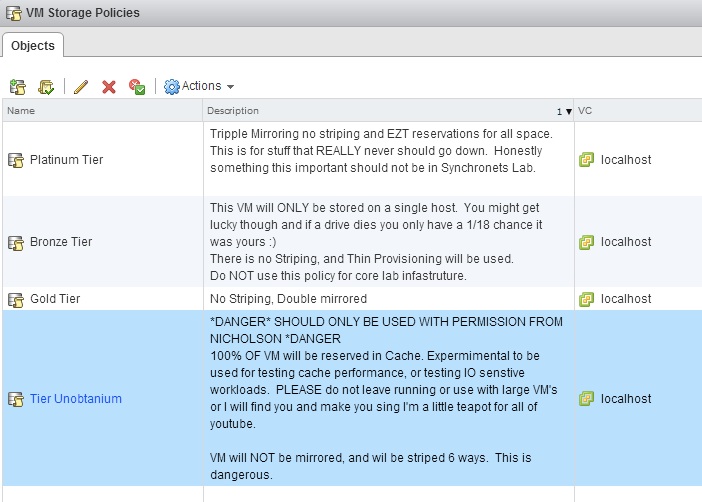
When VASA and storage profiles first came out, I really thought it was not important or over rated for smaller shops. Now that VSAN has broken my lab free of the rule of “one size performance and data protection fits all” I’ve decided to get a bit creative to demonstrate what all can be done. I’ve included some sample tiers, as well as my own guidance on when to use them for staff. Notice how Gold is not the highest tier (A traditional design mistake in Clouds/Labs). The reason for this is simple. If someone asks for something, I can simply ask them “Do you want that on gold tier” and not end up giving them space reservations, Cache reservations, triple mirroring or striping after they demand gold tier for everything. This is key to reducing space wastage in environments where politics trumps resources in provisioning practices.

FunWithvSANProfiles